

Package Contents
 |
|---|
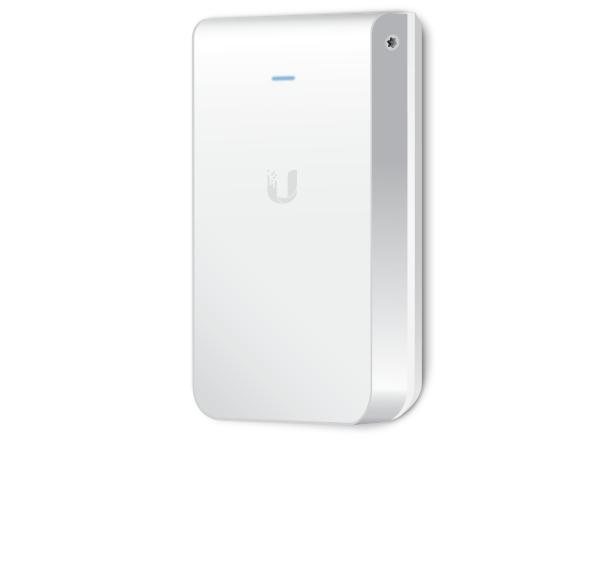
| Cover Plate |
 |
|---|
| UAP-IW-HD |
 |
|---|
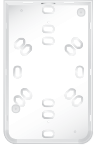
| Back Plate |
 |
|---|
| Wall-Mount Screws (Qty. 4) |
 |
|---|
| Torx Screws (Qty. 2) |
 |
|---|
| Phillips Screws (Qty. 2) |
 |
|---|
| Torx Security Screw |
 |
|---|
| Phillips Security Screw |
Installation Requirements
- Pre-installed electrical wall box
- Category 5 (or above) UTP cabling approved for indoor use
- Phillips and flathead screwdrivers
- T10 Torx bit (for Torx Screw option)
- UniFi Switch with PoE
|
|
IMPORTANT: The UAP-IW-HD requires a UniFi Switch with PoE for power. Passive PoE adapters are not recommended. |
|---|

|
|
IMPORTANT: UniFi Network Application v5.7 is recommended for managing the UAP-IW-HD and is available for download at: ui.com/download/unifi |
|---|
System Requirements
- Linux, Mac OS X, or Microsoft Windows 7/8/10
- Java Runtime Environment 1.8 (or above)
- Web Browser: Google Chrome (Other browsers may have limited functionality.)
- UniFi Network Application v5.7 or newer (available at: ui.com/download/unifi)
Hardware Overview
Back Panel
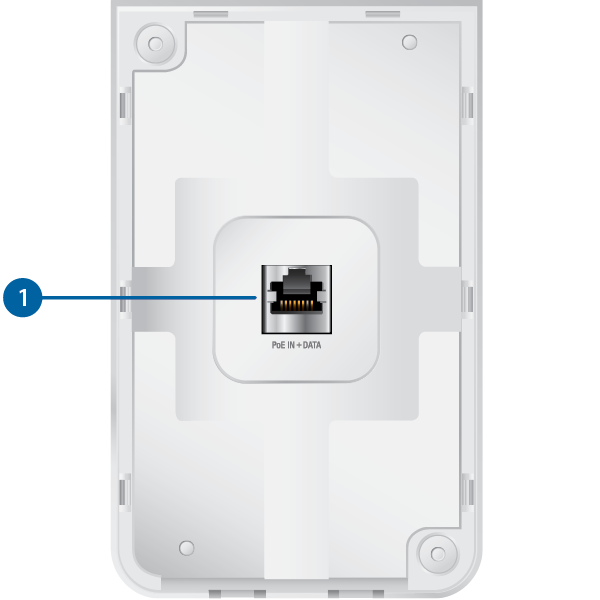

PoE In + Data |
|---|
10/100/1000 Ethernet port supports data and 802.3af PoE input. The UAP-IW-HD itself requires 11W. 802.3at PoE+ input is required to use PoE passthrough. Connect this port to a UniFi Switch with PoE that is connected to your LAN and DHCP server. |
Bottom Panel
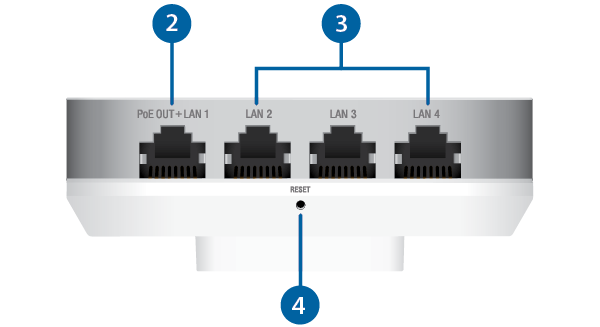

PoE Out + LAN 1 |
||
|---|---|---|
10/100/1000 Ethernet port supports data and PoE passthrough (requires 802.3at PoE+ input). The maximum PoE passthrough output is 12W.
|
||

LAN 2 - LAN 4 |
||
These three 10/100/1000 Ethernet ports support data only. Used to connect client devices to the LAN. |
||
 Reset |
||
The Reset button serves two functions for the UAP-IW-HD:
|

Side Panel
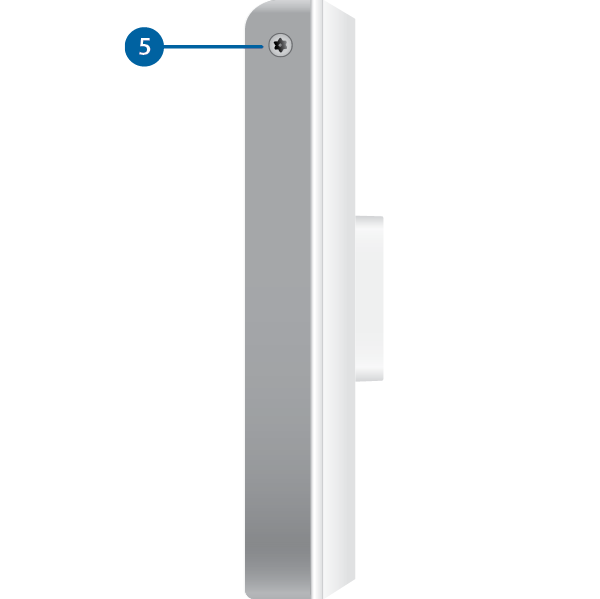

Security Screw |
|---|
(Optional) The Security Screw secures the Cover Plate after installation. You have the option to use the included Torx (shown) or Phillips Security Screw. |
LED
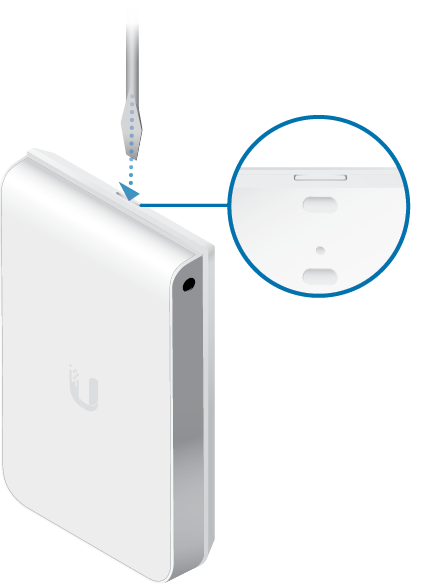
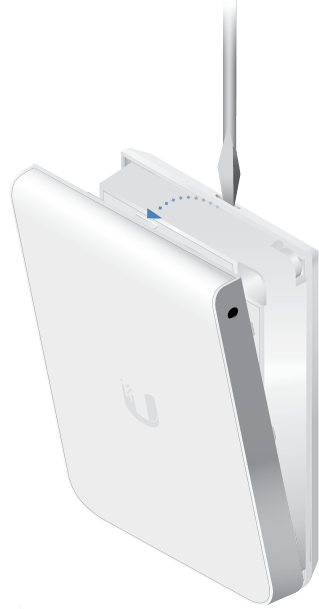
Security Tab
In addition to the optional Security Screw, the Security Tab helps to secure the Cover Plate after installation. If you need to remove it, use a flathead screwdriver to depress the Security Tab while detaching the Cover Plate:
Back Plate
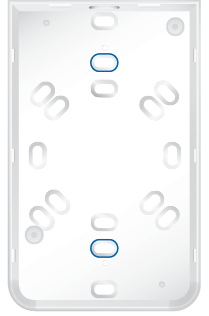
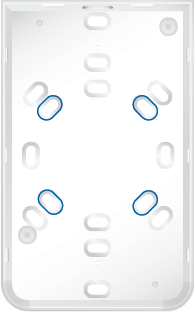
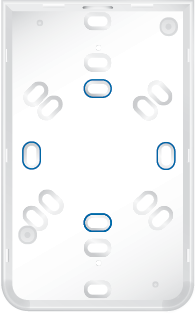
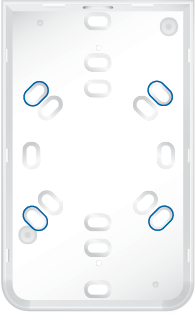
The Back Plate offers a variety of mounting holes for use with different wall boxes. Here are a few examples with the appropriate mounting holes outlined in blue:
USA or China
Europe
|
|
|
|
Hardware Installation
An electrical wall box should be pre-installed with an Ethernet cable running from the box to a UniFi Switch with PoE.
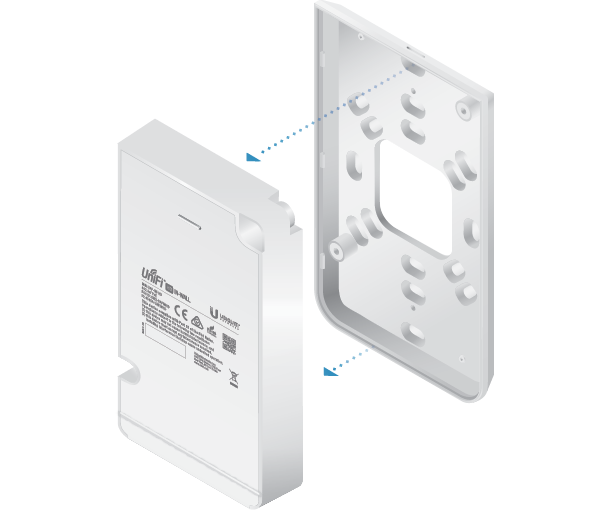
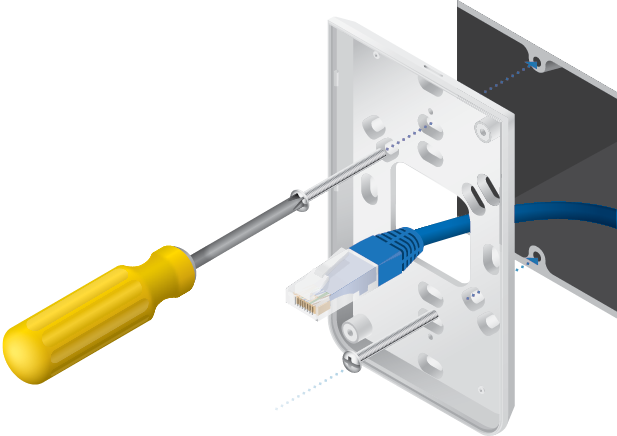
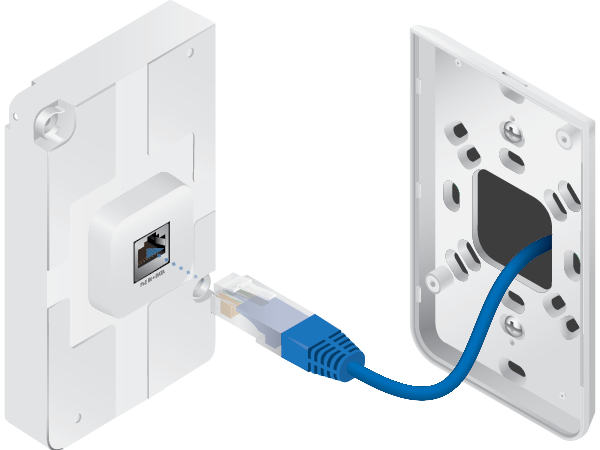
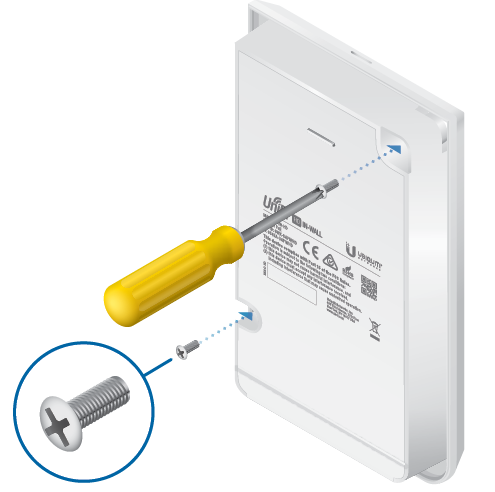
OR
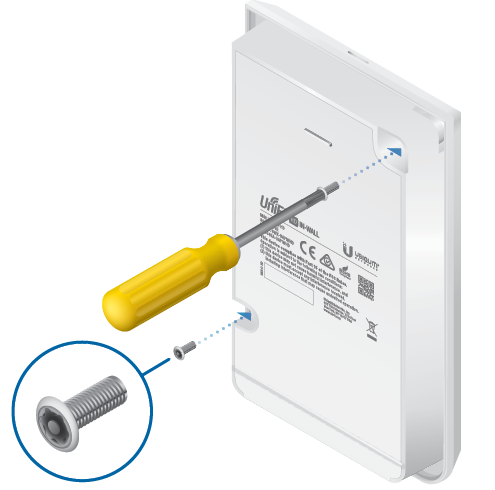
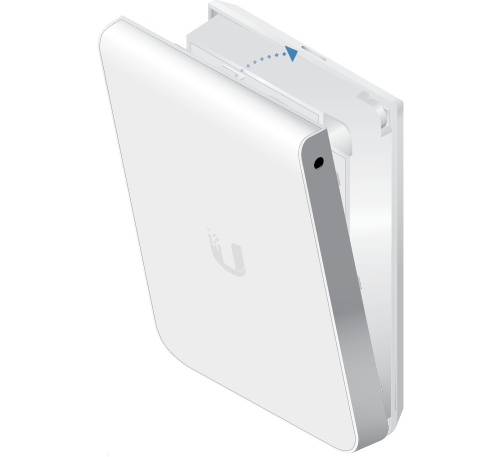
Optional
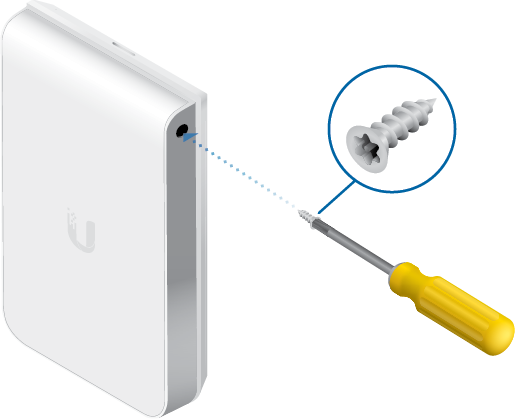
OR
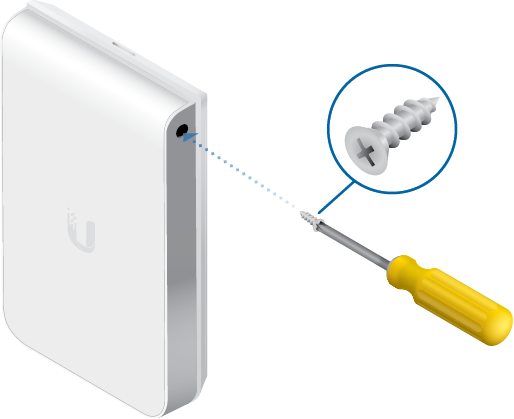
Specifications
|
UAP-IW-HD |
|
|
Dimensions |
139.7 x 86.7 x 25.75 mm |
|---|---|
|
Weight |
210 g (7.41 oz) |
|
Networking Interface |
(5) 10/100/1000 Ethernet Ports |
|
Button(s) |
Reset |
|
Power Method |
802.3af PoE Supported |
|
Power Supply |
UniFi Switch (PoE) |
|
Power Save |
Supported |
|
PoE Out |
48V Passthrough (Pins 1, 2+; 3, 6-) |
|
Max. Power Consumption |
11W |
| with PoE Passthrough | 23W* |
|
Operating Frequency |
2.4 GHz 5 GHz |
|
Max. TX Power |
|
| 2.4 GHz | 23 dBm |
| 5 GHz | 26 dBm |
|
MIMO |
|
| 2.4 GHz | 2 x 2 |
| 5 GHz | 4 x 4 |
|
Max. Data Speed |
|
| 2.4 GHz | 300 Mbps |
| 5 GHz | 1733 Mbps |
|
Antenna Gain |
|
| 2.4 GHz | 1.8 dBi |
| 5 GHz | 4 dBi |
|
Wi-Fi Standards |
802.11 a/b/g/n/ac/ac-wave2 |
|
Wireless Security |
WEP, WPA-PSK, WPA-Enterprise |
|
Mounting |
1-Gang Electrical Wall Box (Not Included) |
|
Operating Temperature |
-10 to 60° C (14 to 140° F) |
|
Operating Humidity |
5 to 95% Noncondensing |
|
Certifications |
CE, FCC, IC |
* Requires 802.3at PoE+ switch.
Safety Notices
- Read, follow, and keep these instructions.
- Heed all warnings.
- Only use attachments/accessories specified by the manufacturer.
| WARNING: Do not use this product in location that can be submerged by water. |
|---|

| WARNING: Avoid using this product during an electrical storm. There may be a remote risk of electric shock from lightning. |
|---|
Electrical Safety Information
- Compliance is required with respect to voltage, frequency, and current requirements indicated on the manufacturer’s label. Connection to a different power source than those specified may result in improper operation, damage to the equipment or pose a fire hazard if the limitations are not followed.
- There are no operator serviceable parts inside this equipment. Service should be provided only by a qualified service technician.
Limited Warranty
The limited warranty requires the use of arbitration to resolve disputes on an individual basis, and, where applicable, specify arbitration instead of jury trials or class actions.
Compliance
FCC
Changes or modifications not expressly approved by the party responsible for compliance could void the user’s authority to operate the equipment.
This device complies with Part 15 of the FCC Rules. Operation is subject to the following two conditions.
- This device may not cause harmful interference, and
- This device must accept any interference received, including interference that may cause undesired operation.
This equipment has been tested and found to comply with the limits for a Class A digital device, pursuant to part 15 of the FCC Rules. These limits are designed to provide reasonable protection against harmful interference when the equipment is operated in a commercial environment. This equipment generates, uses, and can radiate radio frequency energy and, if not installed and used in accordance with the instruction manual, may cause harmful interference to radio communications. Operations of this equipment in a residential area is likely to cause harmful interference in which case the user will be required to correct the interference at his own expense.
This radio transmitter has been approved by FCC.
ISED Canada
CAN ICES-3(A)/NMB-3(A)
This device complies with ISED Canada licence-exempt RSS standard(s). Operation is subject to the following two conditions:
- This device may not cause interference, and
- This device must accept any interference, including interference that may cause undesired operation of the device.
This radio transmitter has been approved by ISED Canada.
The device for operation in the band 5150-5250 MHz is only for indoor use to reduce the potential for harmful interference to co-channel mobile satellite systems.
CAN ICES-3(A)/NMB-3(A)
Le présent appareil est conforme aux CNR d’ISDE Canada applicables aux appareils radio exempts de licence. L’exploitation est autorisée aux deux conditions suivantes :
- l’appareil ne doit pas produire de brouillage;
- l’appareil doit accepter tout brouillage radioélectrique subi, même si le brouillage est susceptible d’en compromettre le fonctionnement.
Le présent émetteur radio a été approuvé par ISDE Canada.
Les dispositifs fonctionnant dans la bande 5150-5250 MHz sont réservés uniquement pour une utilisation à l’intérieur afin de réduire les risques de brouillage préjudiciable aux systèmes de satellites mobiles utilisant les mêmes canaux.
IMPORTANT NOTE
Radiation Exposure Statement
- This equipment complies with radiation exposure limits set forth for an uncontrolled environment.
- This equipment should be installed and operated with minimum distance 20 cm between the radiator and your body.
- This transmitter must not be co-located or operating in conjunction with any other antenna or transmitter.
AVIS IMPORTANT
Déclaration sur l’exposition aux rayonnements
- Cet équipement est conforme aux limites prévues pour l’exposition aux rayonnements dans un environnement non contrôlé.
- Lors de l’installation et de la mise en fonctionnement de l’équipement, assurez-vous qu’il y ait une distance minimale de 20 cm entre l’élément rayonnant et vous.
- Cet émetteur ne doit être installé à proximité d’aucune autre antenne ni d’aucun autre émetteur, et ne doit être utilisé conjointement à aucun autre de ces appareils.
Australia and New Zealand
| Warning: This equipment is compliant with Class A of CISPR 32. In a residential environment this equipment may cause radio interference. |
|---|

Brazil
| Nota: Este equipamento não tem direito à proteção contra interferência prejudicial e não pode causar interferência em sistemas devidamente autorizados. |
|---|

CE Marking
CE marking on this product represents the product is in compliance with all directives that are applicable to it.

 | Country List | |||||||||||||||||||||||||||||||
| ||||||||||||||||||||||||||||||||
BFWA (Broadband Fixed Wireless Access) members noted in blue |
| Note: This device meets Max. TX power limit per ETSI regulations. |
|---|
The following apply to products that operate in the 5 GHz frequency range:
| Note: This device is restricted to indoor use only when operating in the 5150 - 5350 MHz frequency range within all member states. |
|---|
| Note: Operation in the 5.8 GHz frequency band is prohibited in BFWA member states. Other countries listed may use the 5.8 GHz frequency band. |
|---|
WEEE Compliance Statement
Declaration of Conformity
Online Resources
 |  |  |